Web Scraping and Data Handling in Python
Web Scraping Project: Hockey Team Data Handling in Python Project
Project Overview
This project focused on developing hands-on experience in automated web data gathering using Python. The task involved scraping structured hockey team statistics from a live website, cleaning the extracted data, and creating an analysis-ready dataset for further exploration. Web scraping is a fundamental skill in data science that enables collecting valuable information from websites that don’t provide direct API access.
Step-by-Step Implementation
Step 1: Environment Setup and Library Imports
I began by setting up the programming environment using Google Colab and importing essential Python libraries. This included BeautifulSoup for HTML parsing, requests for handling web page retrieval, pandas for data manipulation, and Google Colab’s files module for downloading results. Establishing this foundation ensured all necessary tools were available for the web scraping workflow and provided a cloud-based development environment accessible from anywhere.
Step 2: Web Page Retrieval and HTML Parsing
Using the requests library, I successfully fetched the target web page containing hockey team statistics from ScrapeThisSite.com. The BeautifulSoup library then parsed the HTML content, converting the raw web page into a structured format that could be programmatically navigated and extracted. This step transformed the website’s visual content into machine-readable data, allowing for systematic data extraction from the complex HTML structure.
Step 3: Table Identification and Data Extraction
I located the specific HTML table containing hockey team statistics by searching for the table with the class ‘table’. The extraction process involved two approaches: first, collecting all column headers to understand the data structure, then systematically extracting each row of team statistics. This method ensured comprehensive data capture from the web page while maintaining the relationship between data points and their corresponding labels.
Step 4: Data Cleaning and Validation
The raw extracted data required significant cleaning to become analysis-ready. This involved handling missing values, converting data types from strings to appropriate numeric formats, and validating data consistency. Special attention was given to percentage columns and numeric fields to ensure accurate mathematical operations could be performed later. I also implemented checks for logical inconsistencies in the data.
Step 5: DataFrame Creation and Storage
Using pandas, I created a structured DataFrame to organize the scraped data, using the extracted column headers as proper column names. The data was then exported to CSV format for permanent storage and future analysis. This step transformed the scraped information into a reusable dataset that could be easily shared and analyzed using various data science tools.
Step 6: Alternative Data Extraction Method
I implemented a secondary approach using row-by-row extraction to demonstrate flexibility in web scraping techniques. This method processed each table row individually, extracting and cleaning data before adding it to the DataFrame. This approach provided valuable insights into different data handling strategies and offered a more granular control over the data extraction process.
Key Technical Challenges and Solutions
Challenge 1: HTML Structure Navigation
Solution: Used BeautifulSoup’s find() and find_all() methods to precisely locate the target table and its components, ensuring accurate data extraction despite the complexity of HTML structure. This involved understanding CSS selectors and HTML hierarchy to reliably identify the correct elements.
Challenge 2: Data Type Conversion
Solution: Implemented pandas’ to_numeric() function with error handling to safely convert string data to appropriate numeric types, preventing processing failures from unexpected values. This included handling percentage symbols and other special characters in numeric fields.
Challenge 3: Data Consistency Validation
Solution: Created validation checks to identify logical inconsistencies, such as date_added years preceding release_year, ensuring data quality and reliability. These checks helped maintain data integrity throughout the cleaning process.
Key Lessons Learned
Web Scraping Best Practices: Learned to handle dynamic content and structure changes in web pages, making scrapers more robust and maintainable. Understanding how to write flexible selectors that can adapt to minor website changes.
Data Cleaning Importance: Discovered that raw scraped data often contains inconsistencies that must be addressed before analysis to ensure accurate results. This includes handling missing values, formatting issues, and data type mismatches.
Error Handling Strategies: Developed skills in anticipating and handling common web scraping errors like connection issues, missing elements, and data format variations. Implementing proper exception handling made the scraping process more reliable.
Alternative Approaches: Gained experience implementing multiple data extraction methods, providing flexibility and redundancy in data collection workflows. This included both batch processing and iterative row-by-row extraction.
Cloud Environment Proficiency: Became comfortable working in Google Colab, understanding file system navigation and data persistence in cloud-based development environments. Learned how to efficiently manage files and downloads in cloud notebooks.
Technical Achievements
- Successfully implemented a complete web scraping pipeline from data extraction to a cleaned dataset
- Developed robust error handling for network requests and data parsing
- Created reusable code patterns for future web scraping projects
- Mastered HTML parsing techniques with BeautifulSoup
- Implemented data validation checks to ensure data quality
Project Impact
This web scraping project demonstrates the ability to:
- Extract valuable data from public websites for analysis
- Transform unstructured web content into structured datasets
- Handle real-world data quality challenges
- Create reproducible data collection processes
- Work with cloud-based development environments
Project Resources
📊 Sample Extracted Data
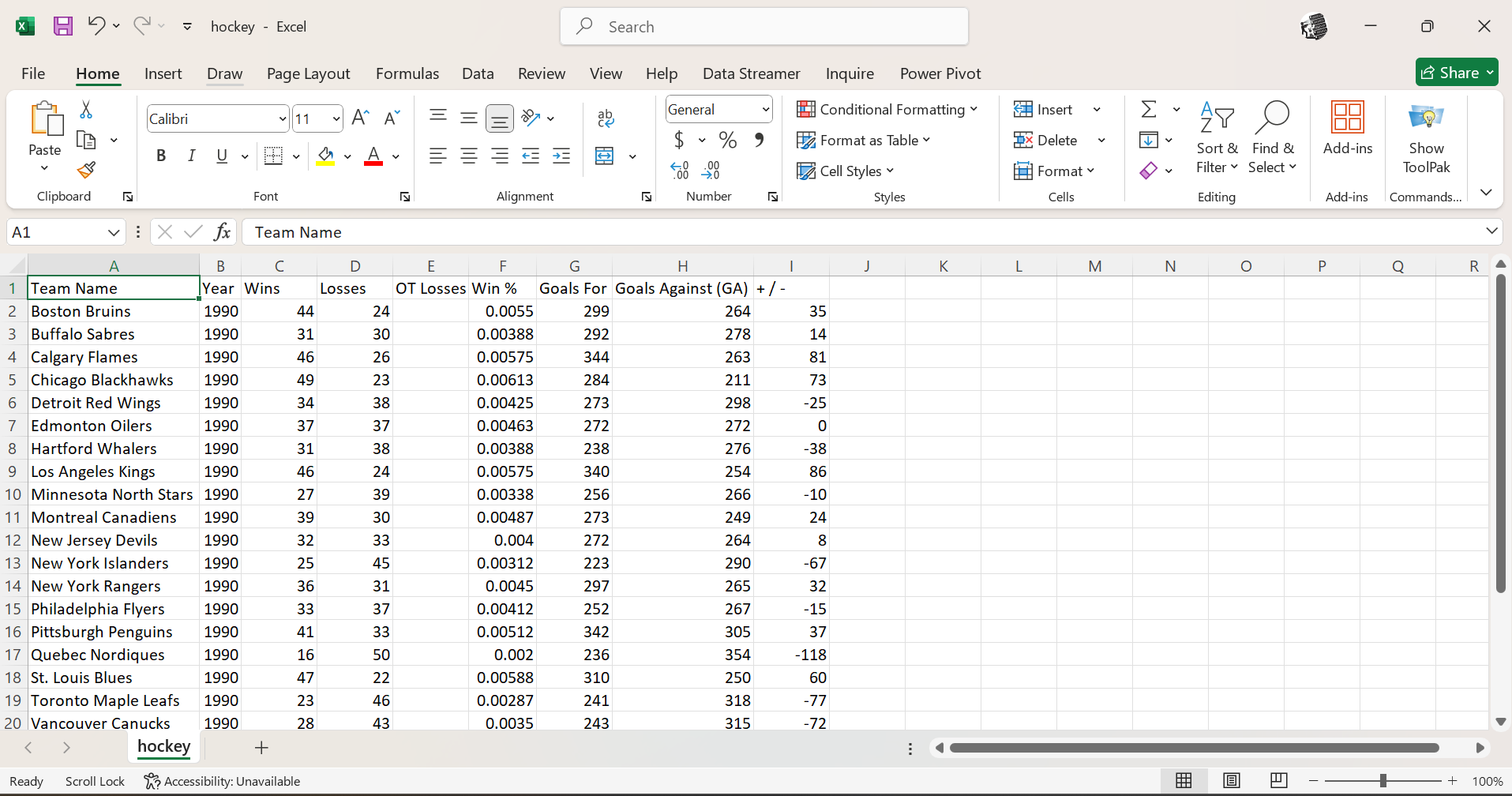 Sample of scraped and cleaned hockey team statistics showing team performance metrics, including wins, losses, and goals data
🔗 Interactive Notebook
Access Full Code on Google Colab
- Complete web scraping implementation
- Data cleaning and validation code
- Alternative extraction methods
- Export functionality
- Project documentation and notes
📁 Project Files
Download Complete Project Files
- Link to the Website with data files
Tools & Technologies Used
- Python 3.x - Programming language
- BeautifulSoup4 - HTML parsing library
- Requests - HTTP library for web requests
- Pandas - Data manipulation and analysis
- Google Colab - Cloud-based development environment
- GitHub - Version control and portfolio hosting
This project was completed as part of the Cyber Shujaa Data and AI Program, demonstrating practical web scraping skills and data extraction capabilities for real-world data analysis applications. The project showcases the ability to gather, clean, and structure data from web sources, a crucial skill in modern data science workflows.